Problem
ในการทดสอบโปรแกรมเพื่อดูว่า sql statement ที่เราใช้มีประสิทธิภาพดีรึเปล่า สิ่งนึงที่เราต้องการคือ data test ที่ค่อนข้างเยอะ ดังนั้นเราจะมา adapt ใช้ Apache Jmeter มาสร้างข้อมูลใน database
Assumption
1. จากที่ใช้เวลาหาข้อมูลเครื่องมือสำหรับ insert test data มานิดหน่อยยังไม่พบแบบที่ต้องการใช้งาน ซึ่งจริงๆ แล้วน่าจะมีที่ดีกว่า Jmeter, user friendly กว่า, เร็วกว่า
2. Jmeter version ที่ใช้คือ 2.8
3. Database ที่ใช้คือ Oracle Database 11g Express Edition
Throubleshooting
Logic คร่าวๆ ของการทำใช้ Jmeter ทำการสร้าง data test ใน database คือกำหนด insert statement โดยใน statement ต้อง set auto comment = false เพื่อลด overhead ที่เกิดจากการ commit ทุกๆ statement จากนั้นกำนหดให้มีการ commit ทุกๆ X records ขึ้นกับความเหมาะสม
ขั้นตอนการทำมีดังนี้
1. เปิด Jmeter
2. click ขวาที่ Test Plan เลือก Add > Thread (Users) > Thread Group
3. click ขวาที่ Thread Group ที่สร้างจากข้อ 2 เลือก Add > Config Element > Counter สร้างตัวแปร counter เพื่อให้ทำการนับจำนวน statement โดยในที่นี้จะให้ commit ทุกๆ 1000 records
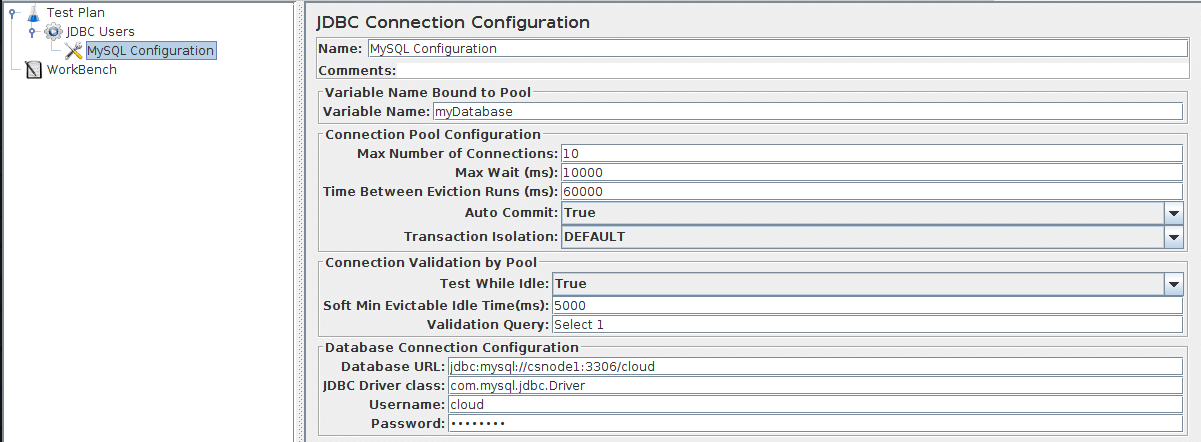
4. click ขวาที่ Thread Group เลือก Add > Config Element > JDBC Connection Configuration เพื่อสร้าง connection profile ในการต่อไปยัง database
- Note: ตั้งค่า Auto Commit เป็น False เพื่อสั่ง commit เอง
5. เลือกที่ Test Plan ทำการเพิ่ม jdbc driver jar ทำได้โดยใน section "Add directory or jar to classpath" กดปุ้ม Browse จากนั้นเลือก jar file ที่ต้องการ กดปุ่ม Open ทั้งนี้ขึ้นกับ jdbc driver class ที่ใช้ในข้อ 4
6. click ขวาที่ Thread Group เลือก Add > Sampler > JDBC Request เพื่อทำการ config sql statement ที่จะใช้ในการสร้าง data test โดยสามารถ customize ได้หลายแบบ ดูได้จาก manual ใน Appendix
7. click ขวาที่ Thread Group เลือก Add > Logic Controller > If Controller เพื่อสร้างเงื่อนไขในการ commit transaction
8. click ขวาที่ If Controller เลือก Add > Sampler > JDBC Request จากนั้นเลือก Query Type เป็น Commit
Conclusion
จากการทดสอบพบว่าใช้งานได้ดีระดับหนึ่ง เนื่องจากสามารถ customize ได้หลายส่วน และสามารถกำหนด concurrence thread เพื่อเพิ่มความเร็วในการ insert data ได้
Appendix
|
|
This sampler lets you send an JDBC Request (an SQL
query) to a database.
Before using this you need to set up a JDBC
Connection Configuration Configuration element
If the Variable Names list is provided, then for
each row returned by a Select statement, the
variables are set up with the value of the
corresponding column (if a variable name is
provided), and the count of rows is also set up. For
example, if the Select statement returns 2 rows of 3
columns, and the variable list is A,,C ,
then the following variables will be set up:
A_#=2 (number of rows)
A_1=column 1, row 1
A_2=column 1, row 2
C_#=2 (number of rows)
C_1=column 3, row 1
C_2=column 3, row 2
If the Select statement returns zero rows, then the
A_# and C_# variables would be set to 0, and no other
variables would be set.
Old variables are cleared if necessary - e.g. if the
first select retrieves 6 rows and a second select
returns only 3 rows, the additional variables for
rows 4, 5 and 6 will be removed.
Note: The latency time is set from the time
it took to acquire a connection.
Control Panel |

Parameters
| Attribute
|
Description
|
Required
|
| Name
|
Descriptive name for this sampler that is shown
in the tree.
|
No
|
| Variable Name
|
Name of the JMeter variable that the connection
pool is bound to. This must agree with the
'Variable Name' field of a JDBC Connection
Configuration.
|
Yes
|
| Query Type
|
Set this according to the statement type:
-
Select Statement
-
Update Statement - use this for Inserts as
well
-
Callable Statement
-
Prepared Select Statement
-
Prepared Update Statement - use this for
Inserts as well
-
Commit
-
Rollback
-
Autocommit(false)
-
Autocommit(true)
-
Edit - this should be a variable reference
that evaluates to one of the above
|
Yes
|
| SQL Query
|
SQL query. Do not enter a trailing semi-colon.
There is generally no need to use { and } to
enclose Callable statements; however they mey be
used if the database uses a non-standard syntax.
[The JDBC driver automatically converts the
statement if necessary when it is enclosed in
{}]. For example:
-
select * from t_customers where id=23
-
CALL SYSCS_UTIL.SYSCS_EXPORT_TABLE (null,?,
?, null, null, null)
-
Parameter values: tablename,filename
-
Parameter types: VARCHAR,VARCHAR
The second example assumes you are using
Apache Derby.
|
Yes
|
| Parameter values
|
Comma-separated list of parameter values. Use
]NULL[ to indicate a NULL parameter. (If
required, the null string can be changed by
defining the property "jdbcsampler.nullmarker".)
The
list must be enclosed in double-quotes if any of
the values contain a comma or double-quote, and
any embedded double-quotes must be doubled-up,
for example:
"Dbl-Quote: "" and Comma: ,"
There must be as many values as there are
placeholders in the statement.
|
Yes, if a prepared or callable statement has
parameters
|
| Parameter types
|
Comma-separated list of SQL parameter types
(e.g. INTEGER, DATE, VARCHAR, DOUBLE). These are
defined as fields in the class java.sql.Types,
see for example: Javadoc
for java.sql.Types . [Note: JMeter will use
whatever types are defined by the runtime JVM,
so if you are running on a different JVM, be
sure to check the appropriate document] If the
callable statement has INOUT or OUT parameters,
then these must be indicated by prefixing the
appropriate parameter types, e.g. instead of
"INTEGER", use "INOUT INTEGER". If not
specified, "IN" is assumed, i.e. "DATE" is the
same as "IN DATE".
If the type is
not one of the fields found in java.sql.Types,
versions of JMeter after 2.3.2 also accept the
corresponding integer number, e.g. since INTEGER
== 4, you can use "INOUT 4".
There
must be as many types as there are placeholders
in the statement.
|
Yes, if a prepared or callable statement has
parameters
|
| Variable Names
|
Comma-separated list of variable names to hold
values returned by Select statements, Prepared
Select Statements or CallableStatement. Note
that when used with CallableStatement, list of
variables must be in the same sequence as the
OUT parameters returned by the call. If there
are less variable names than OUT parameters only
as many results shall be stored in the
thread-context variables as variable names were
supplied. If more variable names than OUT
parameters exist, the additional variables will
be ignored
|
No
|
| Result Variable Name
|
If specified, this will create an Object
variable containing a list of row maps. Each map
contains the column name as the key and the
column data as the value. Usage:
columnValue
                              =
                              vars.getObject("resultObject").get(0).get("Column
                              Name");
|
No
|
See Also:
| Versions of JMeter after 2.3.2 use UTF-8 as the
character encoding. Previously the platform
default was used.
|
| Ensure Variable Name is unique accross Test Plan.
|
|
|
|



No comments:
Post a Comment